
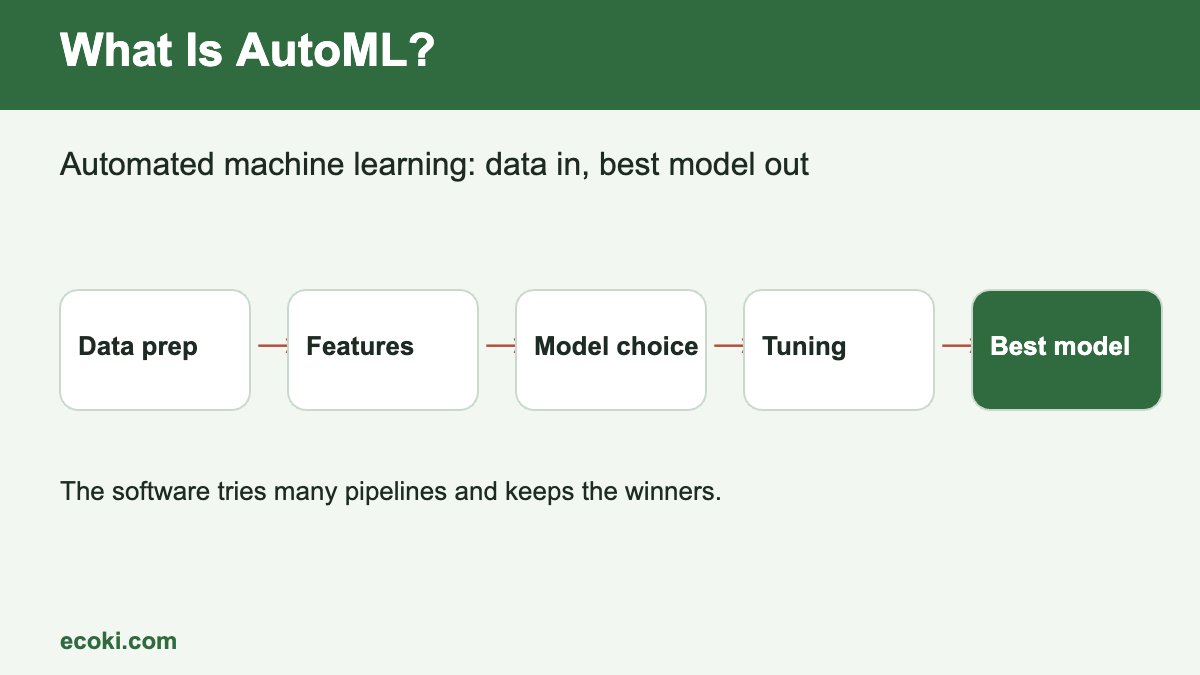
AutoML (automated machine learning) is the use of software to automate the repetitive steps of building a machine learning model: cleaning and preparing data, creating features, choosing an algorithm, tuning its settings and comparing the results. You give an AutoML tool a dataset and a target to predict, and it searches through many candidate models and returns the best one it found.
In short: AutoML does not replace data scientists, but it removes much of the trial and error. A task that once took weeks of manual experiments can often be narrowed down in hours.
AutoML Definition in Plain English
A traditional machine learning project looks like a long checklist. Someone has to clean the data, decide which columns matter, try several algorithms, adjust dozens of settings for each one and test them fairly. Each choice affects the next.
AutoML turns that checklist into a search problem. The software tries combinations automatically, measures each one on held-out data, and keeps the winners. IBM describes it as automating the end-to-end development of machine learning models (IBM).
A one-sentence definition you can use:
AutoML is a set of methods and tools that automatically select, configure and optimise machine learning pipelines for a given dataset and goal, with minimal manual input.
Where the Term “AutoML” Came From
Researchers worked on automatic model selection and hyperparameter tuning for years, but the term became widely known through Google. In a May 17, 2017 post, Google Brain researchers Quoc Le and Barret Zoph described an approach they called “AutoML”: a controller neural network proposes a model design, the design is trained and scored, and the score is fed back so the controller proposes better designs next time. They repeated this thousands of times and reported models on par with expert-designed ones on two standard benchmarks (Google Research).
The same post pointed out why automation is attractive. Even a typical 10-layer network can have around 1010 possible designs, far too many to test by hand.
What AutoML Automates: The Pipeline Step by Step
| Step | What happens manually | What AutoML does |
|---|---|---|
| Data preparation | Fill missing values, fix types, encode categories | Applies standard cleaning and encoding rules automatically |
| Feature engineering | Create new columns (ratios, dates, text features) | Generates and tests candidate features |
| Model selection | Pick between linear models, trees, boosting, neural nets | Trains many algorithm types and compares them |
| Hyperparameter tuning | Adjust learning rate, tree depth, etc. by trial and error | Runs a structured search (e.g. Bayesian optimisation) |
| Ensembling | Combine good models by hand | Builds weighted ensembles of the best models |
| Evaluation | Set up cross-validation and metrics | Validates every candidate the same way and ranks them |
| Deployment (some tools) | Package and serve the model | Exports or hosts the chosen model |
How AutoML Works Under the Hood
Most AutoML systems combine three ideas.
1. A search space
This is the menu of everything the system is allowed to try: algorithms, preprocessing steps and the range of each setting. A bigger menu can find better models but takes longer to search.
2. A search strategy
The system needs a smart way to move through that menu. Common strategies include:
- Random and grid search: simple, but wasteful on large spaces.
- Bayesian optimisation: builds a model of which settings look promising and tests those next.
- Evolutionary algorithms: “breed” good pipelines and mutate them, as TPOT does.
- Reinforcement learning: a controller learns to propose better designs, as in Google’s 2017 work.
3. An evaluation method
Every candidate is scored on data it hasn’t seen, usually with cross-validation. Many tools also stop weak candidates early so time isn’t wasted on them.
Neural Architecture Search (NAS): AutoML for Deep Learning
Neural architecture search is the branch of AutoML that designs neural network structures: how many layers, what kind, and how they connect. It is what Google’s 2017 “AutoML” post focused on.
NAS can find excellent designs, but early versions were extremely compute-hungry. A 2019 study from the University of Massachusetts Amherst estimated that training one large language model with neural architecture search could emit roughly 626,000 pounds (about 284 tonnes) of CO2-equivalent, comparable to the lifetime emissions of about five average American cars (Strubell et al., ACL 2019). Later NAS methods are far more efficient, but energy use is still worth checking. If kilowatt-hours are new to you, our kW vs kWh explainer covers the basics.
How to Keep AutoML Runs Energy-Efficient
Because AutoML trains many models, its energy use adds up quickly. A few habits cut waste without hurting results:
- Start small. Run a 10–15 minute search first and only extend it if the leaderboard is still improving.
- Use early stopping. Let the tool drop weak candidates before they finish training.
- Prefer efficient libraries. Tools such as FLAML are built to find good models on low compute budgets.
- Reuse pre-trained models for images and text instead of searching architectures from scratch.
- Pick a low-carbon cloud region when your provider publishes grid emissions data.
- Log your compute hours so you can compare the cost of a run with the value of the accuracy gain.
Popular AutoML Tools and Platforms
| Tool | Type | Best for | Notes |
|---|---|---|---|
| Auto-sklearn | Open source (Python) | Tabular data on scikit-learn | Uses Bayesian optimisation and meta-learning |
| TPOT | Open source (Python) | Pipeline discovery | Uses genetic programming; exports Python code |
| AutoGluon | Open source (Python) | Tabular, text and image data | Strong stacking and ensembling |
| H2O AutoML | Open source + enterprise | Teams using R or Python | Trains and ranks many models with a leaderboard |
| FLAML | Open source (Python) | Low compute budgets | Designed to be fast and cheap |
| Google Cloud Vertex AI AutoML | Cloud service | Teams already on Google Cloud | No-code UI for images, tables, text |
| Azure Automated ML | Cloud service | Microsoft ecosystem | Integrated with Azure Machine Learning |
| Amazon SageMaker Autopilot | Cloud service | AWS users | Generates notebooks showing what it tried |
| DataRobot | Commercial platform | Enterprises | Includes governance and deployment features |
How Good Is AutoML? What Benchmarks Show
Comparing AutoML tools fairly is harder than it sounds. The authors of AMLB, an open AutoML benchmark published in the Journal of Machine Learning Research in 2024, note that such comparisons are “notoriously challenging and often done incorrectly” (Gijsbers et al., AMLB).
Their benchmark compared 9 well-known AutoML frameworks on 71 classification and 33 regression tasks. It looked not only at accuracy but at inference time and how often frameworks failed. The study found that rankings shift depending on the type of task, so no single tool wins everywhere (JMLR).
What this means in practice:
- Try two or three tools on your own data rather than trusting a general ranking.
- Look at prediction speed, not just accuracy, if the model will run in real time.
- Check failure rates: some tools crash or time out on certain dataset sizes.
Benefits of AutoML
- Speed. Many experiments run in parallel instead of one at a time.
- Accessibility. Analysts and engineers without deep ML training can build solid baseline models.
- Consistency. Every model is validated the same way, which reduces accidental bias in testing.
- Strong baselines. Even experts use AutoML to get a quick benchmark before custom work.
- Less tedious work. Data scientists spend more time on problem framing and data quality.
Limitations and Risks
- Garbage in, garbage out. AutoML can’t fix biased or badly labelled data.
- Less transparency. Large ensembles are hard to explain to regulators or customers.
- Compute cost. Broad searches burn CPU and GPU hours, and money.
- Problem framing is still manual. Choosing the right target and metric is a human decision.
- Leakage blind spots. If future information sneaks into your features, AutoML will happily exploit it and report misleadingly good scores.
AutoML vs Traditional Machine Learning
| Traditional ML | AutoML | |
|---|---|---|
| Who does the work | Data scientist makes every choice | Software searches, human reviews |
| Time to first model | Days to weeks | Minutes to hours |
| Control | Full | Limited to the tool’s search space |
| Explainability | Easier with simple models | Harder with large ensembles |
| Best use | Novel or high-stakes problems | Standard prediction tasks, baselines |
Real-World AutoML Use Cases
Business and Marketing
Churn prediction, lead scoring and demand forecasting are classic tabular problems where AutoML performs well. Marketing teams can get a working model without waiting for a data science queue.
Healthcare
Researchers use AutoML to screen many model types on clinical datasets. Results still need careful validation and expert review before any medical use.
Energy and Sustainability
Utilities and building managers use automated forecasting to predict electricity demand, spot faulty equipment and optimise heating schedules. These models are often the hidden engine behind tools that recommend upgrades after a home energy audit.
Manufacturing
Predictive maintenance models flag machines likely to fail, based on sensor data. AutoML helps test many feature sets quickly.
How to Get Started With AutoML
- Define one clear question. For example: “Will this customer cancel in the next 30 days?”
- Prepare a clean table. One row per example, one column for the answer.
- Split off a final test set. Keep it hidden from the AutoML tool.
- Pick a tool that fits your stack. Open-source Python libraries for flexibility, cloud services for no-code.
- Set a time or cost budget. Most tools let you cap search time.
- Review the winner. Check feature importance and look for leakage.
- Test on the hidden set and only then deploy.
Key AutoML Terms Explained
| Term | Meaning |
|---|---|
| Pipeline | The full chain of steps from raw data to prediction: cleaning, feature creation, model and post-processing. |
| Hyperparameter | A setting chosen before training, such as tree depth or learning rate. It is not learned from the data. |
| HPO | Hyperparameter optimisation: the automated search for the best settings. |
| CASH | “Combined Algorithm Selection and Hyperparameter optimisation”, the formal name for choosing an algorithm and its settings together. |
| Meta-learning | Using results from past datasets to guess good starting points for a new one. |
| Ensemble | A combination of several models whose predictions are averaged or stacked. |
| Leaderboard | The ranked list of candidate models an AutoML tool produces. |
| Search budget | The time or compute limit you give the AutoML run. |
| Data leakage | When information that won’t exist at prediction time slips into training, making results look better than they are. |
Types of AutoML Problems
Classification
Predicting a category: spam or not spam, will churn or won’t churn, which product a customer will buy. This is the most common AutoML use case and where tools are most mature.
Regression
Predicting a number: a house price, next month’s sales or a building’s energy use. AutoML tools typically compare linear models, gradient-boosted trees and neural networks here.
Time-Series Forecasting
Predicting future values from past values, such as daily electricity demand. Forecasting needs special care because the order of the data matters. Good tools split data by time rather than randomly, so the model is never trained on the future.
Computer Vision and Text
Image classification, object detection and text classification. Here AutoML usually fine-tunes large pre-trained models rather than building from scratch, which saves a lot of compute.
Common AutoML Mistakes (and How to Avoid Them)
- Letting the tool see the test set. Keep a final hold-out set that AutoML never touches. Otherwise the reported score is optimistic.
- Optimising the wrong metric. Accuracy is misleading on imbalanced data. If only 2% of cases are fraud, a model that always says “not fraud” is 98% accurate. Use precision, recall or AUC instead.
- Random splits on time data. For forecasting, always split by date.
- Ignoring prediction speed. A huge ensemble may be 1% more accurate but too slow for a live website.
- Skipping the “sanity check” model. Compare against a simple baseline, such as predicting the average. If AutoML barely beats it, your features may be weak.
- Unlimited budgets. Longer searches give diminishing returns. Set a time cap and compare a short run with a long one before paying for more.
AutoML vs No-Code AI vs MLOps
These terms are often mixed up:
- AutoML automates building the model: choosing and tuning it.
- No-code AI is about the interface: drag-and-drop tools that let non-programmers work with data. Many no-code tools use AutoML underneath, but not all AutoML is no-code. Libraries like Auto-sklearn still require Python.
- MLOps covers running models in production: deployment, monitoring, retraining and version control. AutoML gets you a model; MLOps keeps it working.
A Quick AutoML Readiness Checklist
Before you start an AutoML project, check that you can answer “yes” to each of these:
- Do you have a clearly defined target column?
- Do you have at least a few hundred labelled examples, ideally thousands?
- Is the data available at prediction time the same as the data used for training?
- Have you chosen a metric that reflects the real business cost of errors?
- Have you set aside a final test set?
- Do you know who will monitor the model after launch?
If any answer is “no”, fix that first. AutoML speeds up modelling, but it can’t rescue a poorly defined project.
Is AutoML Replacing Data Scientists?
No. It replaces part of their routine. The judgement calls stay human: what to predict, which data is trustworthy, which errors are acceptable and how the model affects people. Google’s own 2017 post framed the goal as making model design “more accessible” to non-experts, not removing experts (Google Research).
AutoML still rests on the basics, so it helps to understand supervised learning first. If you would rather hire a team than build models yourself, our LeewayHertz review looks at one AI development company and its ZBrain platform.
Frequently Asked Questions
What is the simple definition of AutoML?
AutoML is software that automatically builds machine learning models. You provide data and a goal, and it handles data preparation, algorithm selection and tuning, then returns the best model it found. It speeds up routine work but still needs a human to frame the problem and check results.
Is AutoML supervised or unsupervised?
Most AutoML tools focus on supervised learning, meaning classification and regression with labelled data. Some also support time-series forecasting, and a few offer clustering or anomaly detection. Always check which task types a tool supports before choosing it for your project.
Is AutoML free?
Many AutoML libraries are free and open source, including Auto-sklearn, TPOT, AutoGluon, FLAML and H2O AutoML. Cloud services such as Vertex AI, Azure Automated ML and SageMaker Autopilot charge for the compute time used during training and for hosting deployed models.
Does AutoML work for deep learning?
Yes. Neural architecture search is the deep learning branch of AutoML and designs network structures automatically. Several tools also fine-tune pre-trained image and text models. Expect higher compute costs than for tabular data, so set a clear time or budget limit.
What is the difference between AutoML and machine learning?
Machine learning is the field of building models that learn from data. AutoML is a way of doing machine learning where software automates the choices a data scientist would normally make by hand, such as which algorithm to use and how to tune it. The underlying models are the same.
How long does an AutoML run take?
It depends on the data size and the budget you set. Small tabular datasets can produce a useful model in minutes, while large image or text tasks can take hours. Most tools let you set a time limit, and a short run often gets close to the result of a long one.
The Bottom Line
AutoML automates the slow, repetitive parts of machine learning so people can focus on the questions that matter. Use it to build fast baselines, compare approaches fairly and bring ML to teams without specialists. Keep humans in charge of the data, the goal and the final check, and keep an eye on compute and energy costs as you scale.